Привет вам, гость! Войдите, чтобы скачать (For Download, Please register/LogIn)
💾 ДОСТУП К ФАЙЛАМ
Файлы на retro-bit.ru доступны для скачивания по подписке.
Подписка оформляется через добровольное пожертвование (донат).
Выберите подходящий вариант ниже — спасибо за поддержку проекта!
Разовый доступ
100 ₽
единоразово
Нужен один конкретный файл? Сделайте донат от 100 ₽, напишите мне в ЛС на сайте —
и я пришлю ссылку на скачивание или сам файл в личные сообщения.
LVL3 — Media Reaper
500 ₽
доступ на 2 недели
Полный доступ к разделу файлов на две недели. Скачивайте всё, что нужно, без ограничений.
LVL2 — File Access
1000 ₽
доступ на 1 месяц
Полный доступ ко всем файлам сайта на месяц. Удобно, если планируете скачивать регулярно.
LVL1 — File Reaver
5000 ₽
доступ на 1 год
Годовой доступ ко всем файлам сайта. Максимальная выгода для активных пользователей.
📋 Как получить доступ к файлам
Зарегистрируйтесь или войдите на сайт retro-bit.ru, если ещё этого не сделали.
ℹ️ Подписка не продлевается автоматически — по истечении срока доступ закрывается,
и его можно продлить повторным донатом. Если возникли вопросы, пишите в ЛС на сайте,
обязательно разберёмся.
EmeraldGP
Перейти на страницу профиля на retro-bit.ru, чтобы написать личное сообщение.
Скачать программу Retro Effects 1.0.2 для OBS (Ретро Эффекты для ОБС)
Introduction
Retro Effects is an OBS plug-in that provides several filters to simulate retro hardware (e.g.- CRTs, NTSC Signals, etc...) giving your OBS sources an authentic retro look/feel. Retro effects provides the following filters.
Chromatic Aberration
Frame Skip
Interlace
Posterize
Dither
CRT
NTSC
Cathode Boot
Matrix Rain
Retro Codec
VHS
Bloom
Scanlines
Digital Glitch
Analog Glitch
Conclusion
Chromatic Aberration
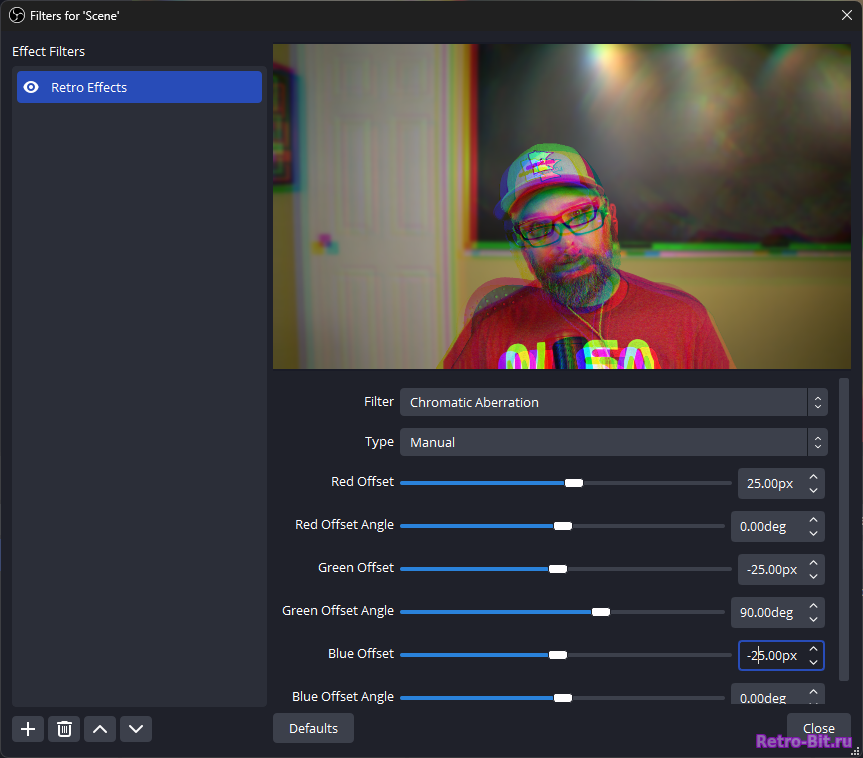
This filter provides the ability to shift the red, green, and blue color channels, either manually using the Manual type, or by simulating lens CA using the Lens type.
In Manual mode, each color channel can be individually shifted by a user specified distance and direction.
In Lens mode, color channels are shifted radially from the source's center by a user specified per-channel amount.
Frame Skip
The frame skip filter allows the user to replicate skipped frames or lower framerates. It provides a single slider to specify the number of frames skipped between frame renders.
Interlace
Interlacing is a technique where alternating lines of an image are displayed in two sequential fields, creating a complete frame that refreshes half of the lines at a time, commonly used in older television broadcasts. This leads to characteristic combing artifacts that are seen when converting interlaced video to modern progressive scan displays.
The interlacing filter allows the user to specify the interlace line thickness, brightness reduction of the alternating field lines, and alpha reduction of the alternating field lines.
Posterize
Posterizing is a process to reduce the number of colors in an image to create a simplified, graphic-like effect, often resembling a poster or comic book style.
Users have the ability to adjust the number of color levels used in the posterization process as well as options for how color palette sampling is handled. Options for sampling include the original image colors, a user specified 2-color gradient, or the horizontal center line of any OBS source or scene.
Dither
Send your video back to Windows 3.1 with the dithering filter. Dithering is a technique used on lower bit-depth displays to smooth transitions between different colors or shades by adding noise or patterns, thereby reducing the appearance of banding or color stepping.
The dithering filter provides the user with both ordered and unordered dithering algorithms that emulate graphics from early windows and mac computers. Options include the ordered dithering pattern used, dither size, colors per channel, monochromatic or color dithering, pixel resampling/rounding, and pre-dither contrast and gamma adjustments.
CRT
The CRT Filter simulates various effects/artifacts as seen on older Cathode Ray Tube displays. Taste the static.
This filter provides 24 different phosphor mask layouts, and the ability to change the mask intensity. Also provides phosphor bloom with adjustable bloom size and threshold, CRT Geometry including corner radius, barrel distortion, and vignetting, and black and white level color correction.
NTSC
NTSC is a video broadcast standard used in North America and parts of South America and Asia, defining how color and monochrome video signals are transmitted and displayed on analog televisions. NTSC comes with its fair share of issues, leading to some calling it "Never The Same Color."
The NTSC filter simulates encoding and decoding a source introducing adjustable artifacts commonly experienced on older analog TVs. User adjustable parameters include:
Tuning Offset: simulates errors in tuning in an NTSC signal
Luma noise: adds static noise to the NTSC luma signal
Luma banding: adjustable size, strength and luma band/ring count.
Chroma bleed size, steps and strength
Brightness and saturation adjustment performed in the same way as done on an analog TV.
Cathode Boot
When turning a CRT on and off, a characteristic vertical and horizontal collapse effect is commonly seen.
The CRT Boot filter provides the user with a progress slider (animatable with the move value plugin) that simulates CRT horizontal and vertical collapse. The user can adjust geometry through the horizontal thickness, vertical thickness, and glow parameters. Additionally the horizontal and vertical collapse as well as final fadout timing can be modified.
Matrix Rain
You are now in The Matrix! The matrix rain filter uses the luminosity of a source, and animates the Matrix asthetic as seen in the iconic movie franchise of the same name.
It might not teach the user Kung-Fu but it will definitely make them say "Woahh!" by giving plenty of options to make the perfect rain effect, including:
Several built-in character/font sets, and the ability to generate your own.
Character scaling
Noise shift to horizontally shift the rain
Option to use source colors for the rain particles, or a user specified font and background color
Black- and White-level adjustment to increase/decrease contrast.
Minimum fade value for rain trails
Active rain character brightness
Rain Trail fade distance
Rain drop speed
Charcater bloom radius, threshold, and intensity.
If you've read this far, you realize it is not just a movie file running in the background.
Retro Codec
Video conference like its 1995 and you've got a sweet new Connectix QuickCam! The Retro Codec filter simulates RPZA video codec in all its blocky, noisy, dithered glory.
User adjustable parameters include pixel scale, colors per channel, quality, keyframe interval, and custom thresholds.
VHS
Be kind, please rewind. The VHS filter emulates many artifacts seen when playing VHS tapes including tape wrinkle, frame jitter, pop lines, and head switching noise. It gives the user many tweakable options:
Frame Jitter: min/max size, min/max period, min/max random interval.
Head Swithing Noise: Primary noise thickness, amount, Secondary noise thickness, horizontal offset, and amount.
Bloom
When is too bright not bright enough? When you want the bloom! The bloom filter will blow out those pesky highlights to give that Glam Cam feel to any OBS source.
Glamourous adjustments include bloom intensity, size, and threshold, a application to luminance, individual color channels, or a custom mix of channels.
Scanlines
Bring your video back to the terminal displays of old with the scanline filter. Adds animated scanlines to your source, with more adjustable parameters than a DEC VT101 Terminal:
Scanline profile types including sine wave, square, sawtooth, smoothstep, or triangular.
Scanline period
Speed
Intensity
Digital Glitch
D-d-d-d-digital glitch. Channel your innner Max Headroom and experience the glitchiness of the digital world. The digital glitch filter emulates artifacts seen in corrupted video formats, including random block displacement and color drift.
User changable fields include:
Block Geometry: maximum displacement, width and height range, interval range.
Color Drift: maximum drift distance, height range, interval range.
Analog Glitch
This broadcast has been interrupted by analog glitch! Unlike the block digital glitch effect, analog glitch shifts and adds noise to your source in a smooth/contiunous way, much like noisy broadcasts back in the days of analog.
Adjust to your hearts content:
Maximum random displacement
Primary Wave speed, scale, and threshold
Secondary Wave speed, scale, threshold, and influence
Interference magnitude, line magnitude, and interference alpha
Color drift maximum distance
Desaturation Amount
Conclusion
Grab the retro effects plugin today (as seen on TV) and party like its 1999.
Чтобы скачать игру или программу (а также другое, что мы там храним) с Яндекс Диска, нужно всего лишь перейти на страницу (она откроется после того, как вы нажмёте кнопку «Скачать» у нас на сайте). Слева вы найдёте кнопку «Скачать»: после нажатия начнётся загрузка на полной скорости вашего интернет‑соединения. Всё проверено и надёжно.
Чтобы скачать игру, программу или другой файл с нашего сайта через торрент, воспользуйтесь торрент‑загрузчиком — тем, что уже есть у вас, либо скачайте его с официального сайта. Очень удобен MediaGet — я постоянно использую именно этот загрузчик.
(Официальный сайт — mediaget.com)
Вы находитесь в разделе: Программы и Утилиты» PC (DOS, Windows)и хотите скачать: Retro Effects 1.0.2 Чтобы играть, вам необходимо записать игру на носитель, например на диск или на флеш-картридж, или играть на компьютере через эмулятор. (Не забудьте - некоторые эмуляторы дисковых приставок требуют BIOS, ищите их у нас в разделе на сайте: BIOS) Эмуляторы все находятся в этом разделе:ЭмуляторЧтобы записать игру на диск, читайте эти статьи: Настройки и Тех.Помощь, Запись игры Здесь находится раздел: Коды, Секреты, Пароли.
Если в сборнике файлов нету необходимого: нужной игры или эмулятора, если желаете, вы можеет их добавить. Перейдите в раздел, нажав кнопку: Добавить. Мы будем вам признательны за наполнение сборника файлов: игр и эмуляторов. Желаем вам хорошего настроения и ностальгии. Retro-Bit.ru
If in the collection of files there is no necessary game or emulator, if you wish, you can add that go to the page: Submit your file. and share your game and other. thx from Retro-Bit.ru
Привет! Портал Retro-Bit живет исключительно на моем личном энтузиазме. Каждый день я наполняю базу знаний, чтобы вам было проще находить любимые игры, коды и гайды.
Сервер и домен стоят денег, а рекламы на сайте нет. Буду искренне благодарен за любую монетку (даже 50 рублей!) на продление жизни сайта. Спасибо, что вы со мной!

 DONATE

 MENU
MENU


 SEARCH

 DONATE